
Exercice VB: Météo des plages
Rédigé par GC Team, Publié le 04 Janvier 2012, Mise à jour le Samedi, 17 Décembre 2022 15:34
Travail à Faire :
Ecrire un sous-programme météo-des-plages() qui demande à l’utilisateur la température de l’air (Tair), celle de l’eau (Teau) et la force du vent (entier >= 0), puis en fonction de ces
Données a?che :
– ”baignade interdite” si la force du vent est supérieure à 7;
– ”baignade déconseillée” si la force du vent est supérieure à 5 et inférieure ou égale `a 7;
– sinon :
– si Tair>=30 et Teau>=20 : ”baignade tr`es agréable”;
– si Tair>=30 et Teau
– si Tair=20 : ”Attention `a la sortie de l’eau”;
– si Tair
1 2 3 4 5 6 7 8 9 10 11 12 13 14 15 16 17 18 19 20 21 22 23 24 25 26 27 28 29 |
Public Sub meteo() Dim Teau As Double, Tair As Double, f As Integer Teau = InputBox("Temp´erature de l’eau ?") Tair = InputBox("Temp´erature de l’air ?") f = InputBox("Force du vent ?") Select Case (f) Case 6 To 7 MsgBox ("Baignade d´econseill´ee")** Case 0 To 5 If Tair >= 30 Then If Teau >= 20 Then MsgBox ("Baignade tr`es agr´eable") Else If Teau < 15 Then MsgBox ("Risque d’hydrocution") End If Else If Tair < 10 Then If Teau >= 20 Then MsgBox ("Attention `a la sortie de l’eau") Else If Teau < 10 Then MsgBox ("Bain du 1er janvier ?") End If End If End If Case Else MsgBox ("Baignade interdite") End Select End Sub |
Exercice Visual Basic : Classe Stagiaire
Entrer le code pour réaliser l'interface suivante:
1 2 3 4 5 6 7 8 9 10 11 12 13 14 15 16 17 18 19 20 21 22 23 24 25 26 27 28 29 30 31 32 33 34 35 36 37 38 39 40 41 42 43 44 45 46 47 48 49 50 51 52 53 54 55 56 57 58 59 60 61 62 63 64 65 66 67 68 69 70 71 72 73 74 75 76 77 78 79 80 81 82 83 84 85 86 87 88 89 90 91 92 93 94 95 96 97 98 99 100 101 102 103 104 105 106 107 108 109 110 111 112 113 114 115 116 117 118 119 120 121 122 123 124 125 126 127 128 129 130 131 132 133 134 135 136 137 138 139 140 141 142 143 144 145 146 147 148 149 150 151 152 153 154 155 156 157 158 159 160 161 162 163 164 165 166 167 168 169 170 171 172 173 174 175 176 177 178 179 180 181 182 183 184 185 186 187 188 189 190 191 192 193 194 195 196 197 198 199 200 201 202 203 204 205 206 207 208 209 210 211 212 213 214 215 216 217 218 219 220 221 222 223 224 225 226 227 228 229 230 231 232 233 234 235 236 237 238 239 240 241 242 243 244 245 246 247 248 249 250 251 252 253 254 255 256 257 258 259 260 261 262 263 264 265 266 267 268 269 270 271 272 273 274 275 276 |
' Indiactions : ' On dispose d'un tableau T de stagiaires de (Nmax +1) stagiares maximum : ' Les indices de ce tableau vont de 0 à Nmax. Il n'est pas nécessaire de remplir ' tout le tableau. N (si >-1) nous indique l'indice du dernier stagiaire introduit dans le tableau. ' pos indique l'indice du stagiaire affiché sur la feuille Const Nmax As Integer = 3 Dim N As Integer, pos As Integer Dim T(Nmax) As Stagiaire ' Sub RecopierZonesDansEnreg(ByVal i As Byte) ' Recopie les données saisies (sur la feuille ) dans le stagiaire ' ayant l'indice i With T(i) .Ins = Val(TxtNumIns.Text) .Nom = Trim(TxtNom.Text) ' Trim élimine les espaces inutiles .Prenom = Trim(TxtPrénom.Text) .DateNaissance = TxtDateNais.Text .adresse = TxtAdr.Text .ville = Trim(CbVille.Text) .masculin = OptMasculin.Checked If Optetat1.Checked Then .etat = 1 ElseIf Optetat2.Checked Then .etat = 2 ElseIf Optetat3.Checked Then .etat = 3 ElseIf Optetat4.Checked Then .etat = 4 End If ' Nous disposons de trois langues : ReDim .langues(2) If ChecLang0.Checked Then .langues(0) = 1 Else .langues(0) = 0 If ChecLang1.Checked Then .langues(1) = 1 Else .langues(1) = 0 If ChecLang2.Checked Then .langues(2) = 1 Else .langues(2) = 0 .Note1 = TxtNote1.Text .Note2 = TxtNote2.Text .Note3 = TxtNote3.Text ' Je calcule ici la moyenne du stagiaire .Moy = (.Note1 + .Note2 + .Note3) / 3 End With End Sub Sub RecopierEnregDansZones(ByVal i As Byte) ' Montre les informations concernant le stagiaire d'indice i sur la feuille With T(i) TxtNumIns.Text = .Ins TxtNom.Text = .Nom TxtPrénom.Text = .Prenom TxtDateNais.Text = .DateNaissance TxtAdr.Text = .adresse CbVille.Text = .ville If .masculin Then OptMasculin.Checked = True Else OptFeminin.Checked = True End If Select Case .etat Case 1 ' Si le champs etat = 1 ==> activer Célibataire ' qui est la première option de l'état civil Optetat1.Checked = True Case 2 ' Si le champs etat = 2 ==> activer Marié(e) Optetat2.Checked = True Case 3 ' Si le champs etat = 3 ==> activer Divorcé(e) Optetat3.Checked = True Case 4 ' Si le champs etat = 4 ==> activer Veuf(ve) Optetat4.Checked = True End Select ChecLang0.Checked = (.langues(0) = 1) ChecLang1.Checked = (.langues(1) = 1) ChecLang2.Checked = (.langues(2) = 1) TxtNote1.Text = Format(.Note1, "0.00") TxtNote2.Text = Format(.Note2, "0.00") TxtNote3.Text = Format(.Note3, "0.00") TxtMoy.Text = Format((.Note1 + .Note2 + .Note3) / 3, "0.00") End With End Sub Private Sub Nouveau_Click(ByVal sender As System.Object, ByVal e As System.EventArgs) Handles Nouveau.Click If N >= Nmax Then MsgBox("Vous n'avez plus le droit d'ajouter un stagiaire", MsgBoxStyle.Exclamation, "Attention") Exit Sub End If pos = N + 1 TxtNumIns.Text = "" TxtNom.Text = "" TxtPrénom.Text = "" TxtDateNais.Text = "" TxtAdr.Text = "" CbVille.Text = "Rabat" OptMasculin.Checked = True Optetat1.Checked = True ChecLang0.Checked = True ChecLang1.Checked = True ChecLang2.Checked = False TxtNote1.Text = "" TxtNote2.Text = "" TxtNote3.Text = "" TxtMoy.Text = "" TxtNumIns.Focus() End Sub Private Sub Form2_FormClosing(ByVal sender As Object, ByVal e As System.Windows.Forms.FormClosingEventArgs) Handles Me.FormClosing If MessageBox.Show("Voulez-vous fermer l'application?", "Fin de l'application", MessageBoxButtons.YesNo, MessageBoxIcon.Question, MessageBoxDefaultButton.Button2) = Windows.Forms.DialogResult.No Then e.Cancel = True End Sub Private Sub Form2_Load(ByVal sender As System.Object, ByVal e As System.EventArgs) Handles MyBase.Load N = -1 pos = 0 End Sub Private Sub Premier_Click(ByVal sender As Object, ByVal e As System.EventArgs) Handles Premier.Click If pos > 0 Then pos = 0 RecopierEnregDansZones(0) Else MsgBox("C'est le premier") End If End Sub Private Sub Dernier_Click(ByVal sender As Object, ByVal e As System.EventArgs) Handles Dernier.Click If pos < N Then pos = N RecopierEnregDansZones(N) Else MsgBox("C'est le dernier") End If End Sub Private Sub Enregistrer_Click(ByVal sender As System.Object, ByVal e As System.EventArgs) Handles Enregistrer.Click ' Cette procédure permet : ' - La modification lorsqu'on affiche un enregistrement existant ' - L'ajout si appel de la procédure Nouveau_Click ' Le seul cas où pos est égal à (N+1) est lorsqu'on a appelé ' la procédure Nouveau_Click. Ainsi, si j'enregistre dans ce cas, le N devra être incrémenté ' Et dans tous les cas (ajout ou modification), on enregistre à la position pos du tableau des stagiaires If pos = N + 1 Then N += 1 End If RecopierZonesDansEnreg(pos) End Sub Private Sub Quitter_Click(ByVal sender As System.Object, ByVal e As System.EventArgs) Handles Quitter.Click Me.Close() End Sub Private Sub Precedent_Click(ByVal sender As System.Object, ByVal e As System.EventArgs) Handles Precedent.Click If pos > 0 Then pos -= 1 RecopierEnregDansZones(pos) Else MsgBox("C'est le premier") End If End Sub Private Sub Rechercher_Click(ByVal sender As System.Object, ByVal e As System.EventArgs) Handles Rechercher.Click Dim NumInscription As Integer, Trouve As Boolean, i As Byte NumInscription = InputBox("Numéro d'inscription à rechercher", "Recherche") Trouve = False i = 0 While Not (Trouve) And (i <= N) If T(i).Ins = NumInscription Then Trouve = True pos = i RecopierEnregDansZones(i) Else i += 1 End If End While If Not Trouve Then MsgBox("Numéro introuvable") End Sub Private Sub Suivant_Click(ByVal sender As System.Object, ByVal e As System.EventArgs) Handles Suivant.Click If pos < N Then pos += 1 RecopierEnregDansZones(pos) Else MsgBox("C'est le dernier") End If End Sub Private Sub Supprimer_Click(ByVal sender As System.Object, ByVal e As System.EventArgs) Handles Supprimer.Click Dim i As Byte ' S'il y'a au plus un stagiaire, signaler qu'il n'y en a plus : N = -1, et faire appel à Nouveau_Click pour ' rénitialiser les zones If (N <= 0) Then N = -1 : Nouveau_Click(sender, e) : Exit Sub ' On veut supprimer le stagiaire d'indice pos : décalage des cellules ' Trace : ' T(pos)= T(pos+1) ' T(pos+1)= T(pos+2) ' ........ ' T(N-1)= T(N) For i = pos To N - 1 T(i) = T(i + 1) Next i 'Après suppression, diminuer la valeur de N N -= 1 ' Si on supprime le stagiaire qui se trouvait à la dernière position, on ' voudra afficher celui qui le précédait : celui-ci se trouve à la position N (la dernière) ' sinon ' le stagiaire qui suivait celui supprimé, va être affiché (T(pos)=T(pos+1)) ' Fin Si If pos > N Then pos = N ' Affichage du stagiaire d'indice pos RecopierEnregDansZones(pos) End Sub Private Sub Calculer_Click(ByVal sender As System.Object, ByVal e As System.EventArgs) Handles Calculer.Click ' Calcul et affichage de la moyenne TxtMoy.Text = Format((CSng(TxtNote1.Text) + CSng(TxtNote2.Text) + CSng(TxtNote3.Text)) / 3, "0.00") End Sub Private Sub Resultat_Click(ByVal sender As System.Object, ByVal e As System.EventArgs) Handles Resultat.Click Dim i As Integer, P As Boolean, St As Stagiaire, Msg As String Do P = False For i = 0 To N - 1 If T(i).Moy < T(i + 1).Moy Then St = T(i) T(i) = T(i + 1) T(i + 1) = St P = True End If Next Loop Until P = False T(0).Clas = 1 For i = 1 To N If T(i - 1).Moy T(i).Moy Then T(i).Clas = i + 1 Else T(i).Clas = T(i - 1).Clas End If Next Msg = "N°" & vbTab & "Nom" & vbTab & "Prenom" & vbTab & "Date de naissance" & vbTab & "Note1" & vbTab & "Note2" & vbTab & "Note3" & vbTab & "Moyenne" & vbTab & "Classement" & vbCrLf For i = 0 To N With T(i) Msg &= .Ins & vbTab & .Nom & vbTab & .Prenom & vbTab & .DateNaissance & vbTab & .Note1 & vbTab & .Note2 & vbTab & .Note3 & vbTab & .Moy & vbTab & .Clas & vbCrLf End With Next 'MsgBox(Msg) txt1.Text = Msg End Sub End Class ---------------------------------------------------------------------------------------------------------------------------------------------------------------------------------------------------------- Module Module1 Structure Stagiaire Dim Ins As Integer Dim Nom As String Dim Prenom As String Dim DateNaissance As Date Dim adresse, ville As String Dim masculin As Boolean Dim Note1, Note2, Note3, Moy As Single Dim etat As Byte Dim langues() As Byte Dim Clas As Byte End Structure End Module |
Exercice Visual Basic : Compte Epargne
On veut réaliser une classe Compte Epargne.
Un compte épargne possède un numéro, un solde, un taux d’intérêt et des intérêts.
Un compte épargne est donc un compte qui permet de générer des intérêts. Il doit fournir une méthode permettant de calculer les intérêts. Il proposera également une méthode visualiser qui permet d’afficher le numéro, le solde et les intérêts.
Coder en VB.NET la classe CompteEpargne
Réaliser une petite application permettant de valider le bon fonctionnement de votre classe.
1 2 3 4 5 6 7 8 9 10 11 12 13 14 15 16 17 18 19 20 21 22 23 24 25 26 27 28 29 30 31 32 33 34 35 36 37 38 39 40 41 42 43 44 45 46 47 48 49 50 51 52 53 54 55 56 57 58 59 60 61 62 63 64 65 66 67 68 69 70 71 72 73 74 75 76 77 78 79 80 81 82 83 84 85 86 87 88 89 90 91 92 93 94 95 96 97 98 |
Public Class CompteEpargne Inherits compte Private taux_int As Double Private interet As Double Property _taux_int() Get Return taux_int End Get Set(ByVal value) value = taux_int End Set End Property Property _interet() Get Return interet End Get Set(ByVal value) value = interet End Set End Property Sub New() End Sub Sub New(ByVal numéro As Double, ByVal _solde As Double, ByVal _taux_int As Double) MyBase.New(numéro, _solde) taux_int = _taux_int End Sub Public Sub calculeinteret() crèditer(_solde * taux_int) interet = _solde * taux_int End Sub Public Overrides Sub afficher() MyBase.afficher() Console.WriteLine(vbTab & vbTab & interet & vbTab & taux_int) End Sub Protected Overrides Sub Finalize() Console.WriteLine("un compte est fermé") End Sub End Class --------------------------------------------------------------------------- Public Class compte Private numéro As Integer Private solde As Double Public listoperation(9) As opération Dim nb As Integer = 0 Property _numéro() As Integer Get Return numéro End Get Set(ByVal value As Integer) value = numéro End Set End Property Property _solde() As Double Get Return solde End Get Set(ByVal value As Double) value = solde End Set End Property Sub New() End Sub Sub New(ByVal _numéro As Integer, ByVal _solde As Double) numéro = _numéro solde = _solde End Sub Public Overridable Sub afficher() Console.WriteLine(numéro & vbTab & solde) End Sub Sub dèbiter(ByVal montant As Double) If solde < montant Then Console.WriteLine(" le solde est insuffisant") Else solde -= montant End If End Sub Sub crèditer(ByVal montant As Double) solde += montant End Sub Sub ajoutopèration(ByVal type As String, ByVal montant As Double) listoperation(nb Mod 10) = New opération(type, montant) nb += 1 End Sub Sub editerreleve() afficher() Dim op As opération For i = 0 To listoperation.GetUpperBound(0) op = listoperation(i) op.affiche() Next End Sub Protected Overrides Sub Finalize() Console.WriteLine("un compte est fermé") End Sub End Class |
Exercice Visual Basic : Créditer & Débiter
Ecrire un programme qui permet de réaliser l'interface suivante:
l'objectif c'est d'entrer un Montant de type créditer ou Débiter du compte bancaire puis l'enregistrer dans le gournale ou annuler l'oppération.
Interface Graphique:
1 2 3 4 5 6 7 8 9 10 11 12 13 14 15 16 17 18 19 20 21 22 23 24 25 26 27 28 29 30 31 32 33 34 35 36 37 38 39 40 41 42 43 44 45 46 47 48 49 50 51 52 53 54 55 56 57 58 59 60 61 62 63 64 65 66 67 68 69 70 71 72 73 74 75 76 77 78 |
Public Class Form1 Inherits System.Windows.Forms.Form Dim a, b As Integer Private Sub Button3_Click(ByVal sender As System.Object, ByVal e As System.EventArgs) Handles Button3.Click End End Sub Private Sub Button1_Click(ByVal sender As System.Object, ByVal e As System.EventArgs) Handles Button1.Click Try a = CInt(Me.TextBox1.Text) If Me.RadioButton1.Checked Then Me.ListBox1.Items.Add(Me.TextBox1.Text) Me.ListBox2.Items.Add("0") col1.Add("0") col.Add(Me.TextBox1.Text) Else Me.ListBox2.Items.Add(Me.TextBox1.Text) Me.ListBox1.Items.Add("0") col.Add("0") col1.Add(Me.TextBox1.Text) End If Dim totalc As Integer For i As Integer = 1 To col.Count a = col.Item(i) totalc = totalc + CInt(a) Next Me.Label7.Text = totalc Dim totald As Integer For i As Integer = 1 To col1.Count a = col1.Item(i) totald = totald + CInt(a) Next Me.Label8.Text = totald Me.Label9.Text = totalc - totald Catch ex As Exception MsgBox("données non valide") End Try End Sub Private Sub Form1_Load(ByVal sender As System.Object, ByVal e As System.EventArgs) Handles MyBase.Load Me.RadioButton1.Checked = True Me.Label7.Text = 0 Me.Label8.Text = 0 Me.Label9.Text = 0 End Sub Private Sub Button2_Click(ByVal sender As System.Object, ByVal e As System.EventArgs) Handles Button2.Click Try Me.ListBox1.Items.Clear() a = col.Count col.Remove(a) For i As Integer = 1 To col.Count Me.ListBox1.Items.Add(col.Item(i)) Next Me.ListBox2.Items.Clear() a = col1.Count col1.Remove(a) For i As Integer = 1 To col1.Count Me.ListBox2.Items.Add(col1.Item(i)) Next Dim totalc As Integer For i As Integer = 1 To col.Count a = col.Item(i) totalc = totalc + CInt(a) Next Me.Label7.Text = totalc Dim totald As Integer For i As Integer = 1 To col1.Count a = col1.Item(i) totald = totald + CInt(a) Next Me.Label8.Text = totald Me.Label9.Text = totalc - totald Catch ex As Exception MsgBox("la liste est vide") End Try End Sub End Class |
Exercice Visual Basic : EFF TSDI Juin 2008 Variante 1
Le gérant d’une société de commercialisation des pièces électroniques souhaite développer une application pour gérer les ventes, pour cela, il a fait appel à un développeur en free lance pour concevoir et mettre en œuvre ce nouveau système.
Le Développeur a proposé le schéma relationnel suivant :
|
Clients(N°Client, Nom, Prénom, Titre, Adresse, CodePostal, Ville, Téléphone) Factures(N°Facture, N°Client, DateFacture, Remarques) DétailsFacture(N°Facture, RefProduit, Quantité, Remise) Produits(RefProduit, Description, Catégorie, PrixVente) |
Travail à faire :
- Créer la base de données sous SQL SERVER (2 Pts)
- Faire quelques enregistrements pour le test
- Créer une interface de mise à jour des clients (4 Pts)
- Ajout (le contrôle de saisie est obligatoire et confirmation d’ajout)
- Modification
- Suppression
- Boutons de navigation
- Créer une interface de mise à jour des produits (2 Pts)
- Créer une interface de mise à jour des factures et Détails Facture (4 Pts)
- Créer une feuille de recherche :
- Recherche client (Afficher les informations relatives à un client) (2 Pts)
- Recherche facture :
- i. Avec le N°Facture (Afficher les détails d’une facture) (2 Pts)
- ii. Par date (Afficher la liste des factures enregistrées) (2 Pts)
- iii. Entre deux dates (Afficher la liste des factures enregistrées entre deux dates) (2 Pts)
- Créer un état pour imprimer une facture avec les détails et le montant de la facture (4 Pts)
- Créer un état permettant de lister les factures entre deux dates (2 Pts)
- Empaqueter et déployer votre application (3 Pts)
- Créer une page web permettant d’afficher la liste des produits (2 Pts)
- Créer une page permettant de passer une commande via Internet, une commande validée doit avoir au moins un produit. Le client doit s’enregistrer avant de passer une commande, si le client est déjà enregistré, il suffit d’indiquer son N°Client (6 Pts)
- Après validation d’une commande, un message de confirmation doit s’afficher avec le montant total des produits choisis (3 Pts)
1 2 3 4 5 6 7 8 9 10 11 12 13 14 15 16 17 18 19 20 21 22 23 24 25 26 27 28 29 30 31 32 33 34 35 36 37 38 39 40 41 42 43 44 45 46 47 48 49 50 51 52 53 54 55 56 57 58 59 60 61 62 63 64 65 66 67 68 69 70 71 72 73 74 75 76 77 78 79 80 81 82 83 84 85 86 87 88 89 90 91 92 93 94 95 96 97 98 99 100 101 102 103 104 105 106 107 108 109 110 111 112 113 114 115 116 117 118 119 120 121 122 123 124 125 126 127 128 129 130 131 132 133 134 135 136 137 138 139 140 141 142 143 144 145 146 147 148 149 150 151 152 153 154 155 156 157 158 159 160 161 162 163 164 165 166 167 168 169 170 171 172 173 174 175 176 177 178 179 180 181 182 183 184 185 186 187 188 189 190 191 192 193 194 195 196 197 198 199 200 201 202 203 204 205 206 207 208 209 210 211 212 213 |
Public Class Form1 Private Sub Form1_Load(ByVal sender As System.Object, ByVal e As System.EventArgs) Handles MyBase.Load 'TODO : cette ligne de code charge les données dans la table 'GMDSET.Clients'. Vous pouvez la déplacer ou la supprimer selon vos besoins. Me.ClientsTableAdapter.Fill(Me.GMDSET.Clients) End Sub Private Sub Button1_Click(ByVal sender As System.Object, ByVal e As System.EventArgs) Handles Button1.Click Try Me.ClientsTableAdapter.InsertQuery(NclientTextBox.Text, NomTextBox.Text, PrenomTextBox.Text, TitreTextBox.Text, AdresseTextBox.Text, CodepostalTextBox.Text, VilleTextBox.Text) MsgBox(" Le client est ajouté !") Me.ClientsTableAdapter.Fill(Me.GMDSET.Clients) Catch ex As Exception MsgBox(ex.Message) End Try End Sub Private Sub Button2_Click(ByVal sender As System.Object, ByVal e As System.EventArgs) Handles Button2.Click Try Dim i As Integer i = InputBox(" Suppression ", " Entrez le numéro du client a supprimé ( Attention toutes les informations relatives a ce client seront supprimées ) !") Me.ClientsTableAdapter.DeleteQuery(i) Me.ClientsTableAdapter.Fill(Me.GMDSET.Clients) Catch ex As Exception MsgBox(ex.Message) End Try End Sub Private Sub Button3_Click(ByVal sender As System.Object, ByVal e As System.EventArgs) Handles Button3.Click Try Me.ClientsTableAdapter.UpdateQuery(NclientTextBox.Text, NomTextBox.Text, PrenomTextBox.Text, TitreTextBox.Text, AdresseTextBox.Text, CodepostalTextBox.Text, VilleTextBox.Text, nClient) MsgBox(" Client modifié ! ") Me.ClientsTableAdapter.Fill(Me.GMDSET.Clients) Catch ex As Exception MsgBox(ex.Message) End Try End Sub Private Sub Button4_Click(ByVal sender As System.Object, ByVal e As System.EventArgs) Handles Button4.Click Try Dim i As Integer i = InputBox("Recherche", "Entrez le numéro du client à rechrecher !") Me.ClientsTableAdapter.FillBynumclient(Me.GMDSET.Clients, i) nClient = NclientTextBox.Text Catch ex As Exception MsgBox(ex.Message) End Try End Sub End Class ----------------------------------------------------------------------------- Public Class Form2 Private Sub Form2_Load(ByVal sender As System.Object, ByVal e As System.EventArgs) Handles MyBase.Load 'TODO : cette ligne de code charge les données dans la table 'GMDSET.Clients'. Vous pouvez la déplacer ou la supprimer selon vos besoins. Me.ClientsTableAdapter.Fill(Me.GMDSET.Clients) 'TODO : cette ligne de code charge les données dans la table 'GMDSET.factures'. Vous pouvez la déplacer ou la supprimer selon vos besoins. Me.FacturesTableAdapter.Fill(Me.GMDSET.factures) Try ComboBox1.SelectedValue = NclientTextBox.Text Catch ex As Exception End Try End Sub Private Sub Button1_Click(ByVal sender As System.Object, ByVal e As System.EventArgs) Handles Button1.Click Try Me.FacturesTableAdapter.InsertQuery(Val(NfactureTextBox.Text), Val(NclientTextBox.Text), CDate(DatefactureDateTimePicker.Text), RemarquesTextBox.Text) MsgBox(" Facture Ajoutée !") Me.FacturesTableAdapter.Fill(Me.GMDSET.factures) Catch ex As Exception MsgBox(ex.Message) End Try End Sub Private Sub ComboBox1_SelectedIndexChanged(ByVal sender As System.Object, ByVal e As System.EventArgs) Handles ComboBox1.SelectedIndexChanged Try NclientTextBox.Text = ComboBox1.SelectedValue.ToString Catch ex As Exception End Try End Sub Private Sub Button2_Click(ByVal sender As System.Object, ByVal e As System.EventArgs) Handles Button2.Click Try Dim i As Integer i = InputBox("Suppression ", "Entrez le numéro de la facture a supprimer") Me.FacturesTableAdapter.DeleteQuery(i) MsgBox(" Supprimée") Me.FacturesTableAdapter.Fill(Me.GMDSET.factures) Catch ex As Exception MsgBox(ex.Message) End Try End Sub Private Sub Button3_Click(ByVal sender As System.Object, ByVal e As System.EventArgs) Handles Button3.Click Try Me.FacturesTableAdapter.UpdateQuery(NfactureTextBox.Text, NclientTextBox.Text, DatefactureDateTimePicker.Text, RemarquesTextBox.Text, nfacture) MsgBox(" Facture modifiée ") Me.FacturesTableAdapter.Fill(Me.GMDSET.factures) Catch ex As Exception MsgBox(ex.Message) End Try End Sub Private Sub Button4_Click(ByVal sender As System.Object, ByVal e As System.EventArgs) Handles Button4.Click Try Dim i As Integer i = InputBox("Recherche ", "Entrez le numéro de la facture a rechercher") Me.FacturesTableAdapter.FillBynum(Me.GMDSET.factures, i) nfacture = i Catch ex As Exception MsgBox(ex.Message) End Try End Sub End Class ---------------------------------------------------------------------------- Public Class Form3 Private Sub Form3_Load(ByVal sender As System.Object, ByVal e As System.EventArgs) Handles MyBase.Load 'TODO : cette ligne de code charge les données dans la table 'GMDSET.produits'. Vous pouvez la déplacer ou la supprimer selon vos besoins. Me.ProduitsTableAdapter.Fill(Me.GMDSET.produits) End Sub Private Sub Button1_Click(ByVal sender As System.Object, ByVal e As System.EventArgs) Handles Button1.Click Try Me.ProduitsTableAdapter.InsertQuery(RedproduitTextBox.Text, DescriptionTextBox.Text, CategorieTextBox.Text, PrixventeTextBox.Text) MsgBox(" Ajouté !") Me.ProduitsTableAdapter.Fill(Me.GMDSET.produits) Catch ex As Exception MsgBox(ex.Message) End Try End Sub Private Sub Button2_Click(ByVal sender As System.Object, ByVal e As System.EventArgs) Handles Button2.Click Try Dim i As Integer i = InputBox("Suppression", " entrez le numero du produit a supprimer") Me.ProduitsTableAdapter.DeleteQuery(i) Me.ProduitsTableAdapter.Fill(Me.GMDSET.produits) Catch ex As Exception MsgBox(ex.Message) End Try End Sub Private Sub Button3_Click(ByVal sender As System.Object, ByVal e As System.EventArgs) Handles Button3.Click Try Me.ProduitsTableAdapter.UpdateQuery(Val(RedproduitTextBox.Text), DescriptionTextBox.Text, CategorieTextBox.Text, Val(PrixventeTextBox.Text), refprod) MsgBox(" Modifié !") Me.ProduitsTableAdapter.Fill(Me.GMDSET.produits) Catch ex As Exception MsgBox(ex.Message) End Try End Sub Private Sub Button4_Click(ByVal sender As System.Object, ByVal e As System.EventArgs) Handles Button4.Click Try Dim i As Integer i = InputBox("RECHERCHE", " entrez le numero du produit a rechercher") refprod = i Me.ProduitsTableAdapter.FillByref(Me.GMDSET.produits, i) Catch ex As Exception MsgBox(ex.Message) End Try End Sub End Class ----------------------------------------------------------------------------- Public Class Form4 Private Sub DetailsfacturesBindingNavigatorSaveItem_Click(ByVal sender As System.Object, ByVal e As System.EventArgs) Me.Validate() Me.DetailsfacturesBindingSource.EndEdit() Me.TableAdapterManager.UpdateAll(Me.GMDSET) End Sub Private Sub Form4_Load(ByVal sender As System.Object, ByVal e As System.EventArgs) Handles MyBase.Load 'TODO : cette ligne de code charge les données dans la table 'GMDSET.detailsfactures'. Vous pouvez la déplacer ou la supprimer selon vos besoins. Me.DetailsfacturesTableAdapter.Fill(Me.GMDSET.detailsfactures) End Sub End Class ----------------------------------------------------------------------------- Partial Class GMDSET End Class Namespace GMDSETTableAdapters Partial Public Class facturesTableAdapter End Class End Namespace ------------------------------------------------------------------------------ Module Module1 Public nClient As Integer Public nfacture As Integer Public refprod As Integer End Module |
Exercice Visual Basic : Espace national du Livre
Ecrire le programme qui permet de réaliser l'interface suivante: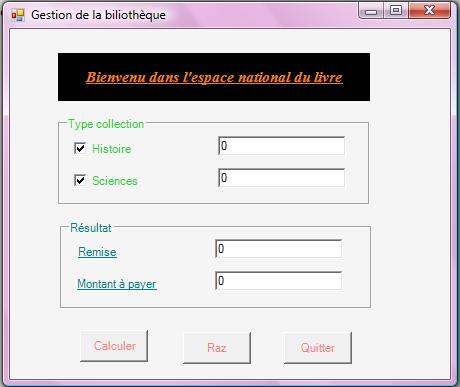
1 2 3 4 5 6 7 8 9 10 11 12 13 14 15 16 17 18 19 20 21 22 23 24 25 26 27 28 29 30 31 32 33 34 35 36 37 38 39 40 41 42 43 44 45 46 47 48 49 50 51 52 53 54 55 56 57 58 59 60 61 62 63 64 65 66 67 68 69 70 71 72 73 74 75 76 77 78 79 80 81 82 83 84 85 86 87 88 89 90 91 92 93 94 95 96 97 98 99 100 101 102 103 104 105 106 107 108 109 110 111 112 113 114 115 116 |
Public Class cancel Private Sub Form1_Load(ByVal sender As System.Object, ByVal e As System.EventArgs) Handles MyBase.Load End Sub Private Sub CheckBox1_CheckedChanged(ByVal sender As System.Object, ByVal e As System.EventArgs) Handles h.CheckedChanged If sender Is h Then sel(Qteh, h) End If End Sub Private Sub Button3_Click(ByVal sender As System.Object, ByVal e As System.EventArgs) Handles Button3.Click Dim a = MsgBox("voulez vouz vraiment nous quitter ?", MsgBoxStyle.YesNo Or MsgBoxStyle.Information, "Quitter..!!!") If a = vbYes Then End End If End Sub Private Sub GroupBox1_Enter(ByVal sender As System.Object, ByVal e As System.EventArgs) Handles m.Enter End Sub Private Sub TextBox1_TextChanged(ByVal sender As System.Object, ByVal e As System.EventArgs) Handles Qteh.TextChanged End Sub Private Sub TextBox2_TextChanged(ByVal sender As System.Object, ByVal e As System.EventArgs) Handles Qtes.TextChanged End Sub Private Sub TextBox4_TextChanged(ByVal sender As System.Object, ByVal e As System.EventArgs) Handles remise.TextChanged End Sub Private Sub TextBox3_TextChanged(ByVal sender As System.Object, ByVal e As System.EventArgs) Handles map.TextChanged End Sub Private Sub Button1_Click(ByVal sender As System.Object, ByVal e As System.EventArgs) Handles Button1.Click Dim remis As Single Dim mnt As Single If h.Checked = True Then remise.Text = calcrem(CInt(Qteh.Text)) mnt = 100 * CInt(Qteh.Text) End If If s.Checked = True Then remise.Text = calcrem(CInt(Qtes.Text)) mnt = 120 * CInt(Qtes.Text) End If If h.Checked And s.Checked Then remise.Text = calcrem(CInt(Qteh.Text) + CInt(Qtes.Text)) mnt = 120 * CInt(Qtes.Text) + 100 * CInt(Qteh.Text) End If map.Text = mnt * (1 - remise.Text) End Sub Private Sub Button2_Click(ByVal sender As System.Object, ByVal e As System.EventArgs) Handles Button2.Click remise.ResetText() Qteh.ResetText() Qtes.ResetText() map.ResetText() remise.Text = 0 Qteh.Text = 0 Qtes.Text = 0 map.Text = 0 Qtes.Visible = False Qteh.Visible = False h.Checked = False s.Checked = False End Sub Public Function calcrem(ByVal qte As Integer) As Single Dim r As Single 'une variable dans laquelle on va calculer la remise If qte >= 20 Then r = 10 / 100 ElseIf qte >= 10 Then r = 8 / 100 ElseIf qte >= 5 Then r = 5 / 100 Else r = 0 End If Return r End Function Private Sub sel(ByVal a As TextBox, ByVal b As CheckBox) a.Visible = b.Checked a.Text = 0 a.Focus() a.SelectionStart = 0 End Sub Private Sub s_CheckedChanged(ByVal sender As System.Object, ByVal e As System.EventArgs) Handles s.CheckedChanged If sender Is s Then sel(Qtes, s) End If End Sub End Class |
Exercice Visual Basic : Examen Fin de Formation TSDI Juin 2008 Variante 6
Une agence de voyage souhaite développer une application pour la gestion des voyages des particuliers. Pour cela, on vous propose le modèle relationnel suivant :
CLIENTS (noclient, nom, téléphone, adresse, codepostal)
CIRCUITS (nocircuit, destination, duree, caracteristiques )
VOYAGES (novoyage, date, nocircuit, prix, nbPlacemaxi)
INSCRIPTIONS (noclient, novoyage, date)
Travail à faire :
- Créer la base de données sous SQL SERVER (2 Pts)
- Faire quelques enregistrements pour le test
- Créer une interface de mise à jour des Client (4 Pts)
- Ajout (le contrôle de saisie est obligatoire et confirmation d’ajout)
- Modification
- Suppression
- Boutons de navigation
- Créer une interface de mise à jour des Circuits (2Pts)
- Créer une interface de mise à jour des Voyages et Inscriptions (4Pts)
- Créer une feuille de recherche :
- Les voyages planifiées entre deux dates (2Pts)
- Liste des clients inscris pour un voyage donné (2Pts)
- Sachant qu’une remise de 5% sur les frais du voyage est accordée à tous les clients en mois d’Octobre, Février et Mars. Faire les modifications nécessaires pour prendre en compte cette remise (2Pts)
- Créer un état pour afficher les voyages entre deux dates données (2Pts)
- Créer un état permettant de lister les inscrits pour un voyage donné (2Pts)
- Créer un état permettant d’afficher le nombre d’inscrits par voyage entre deux dates (2Pts)
1 2 3 4 5 6 7 8 9 10 11 12 13 14 15 16 17 18 19 20 21 22 23 24 25 26 27 28 29 30 31 32 33 34 35 36 37 38 39 40 41 42 43 44 45 46 47 48 49 50 51 52 53 54 55 56 57 58 59 60 61 62 63 64 65 66 67 68 69 70 71 72 73 74 75 76 77 78 79 80 81 82 83 84 85 86 87 88 89 90 91 92 93 94 95 96 97 98 99 100 101 102 103 104 105 106 107 108 109 110 111 112 113 114 115 116 117 118 119 120 121 122 123 124 125 126 127 128 129 130 131 132 133 134 135 136 137 138 139 140 141 142 143 144 145 146 147 148 149 150 151 152 153 154 155 156 157 158 159 160 161 162 163 164 165 166 167 168 169 170 171 172 173 174 175 176 177 178 179 180 181 182 183 184 185 186 187 188 189 190 191 192 193 194 195 196 197 198 199 200 201 202 203 204 205 206 207 208 209 210 211 212 213 214 215 216 217 218 219 220 221 222 223 224 225 226 227 228 229 230 231 232 233 234 235 236 237 238 239 240 241 242 243 244 245 246 247 248 249 250 251 252 253 254 255 256 257 258 259 260 261 262 263 264 265 266 267 268 269 270 271 272 273 274 275 276 277 278 279 280 281 282 283 284 285 286 287 288 289 290 291 292 293 294 295 296 297 298 299 300 301 302 303 304 305 306 307 308 309 310 311 312 313 314 315 316 317 318 319 320 321 322 323 324 325 326 327 328 329 330 331 332 333 334 335 336 337 338 339 340 341 342 343 344 345 346 347 348 349 350 351 352 353 354 355 356 357 358 359 360 361 362 363 364 365 366 367 368 369 370 371 372 373 374 375 376 377 378 379 380 381 382 383 384 385 386 387 388 389 390 391 392 393 394 395 396 397 398 399 400 401 402 403 404 405 406 407 408 409 410 411 412 413 414 415 416 417 418 419 420 421 422 423 424 425 426 427 428 429 430 431 432 433 434 435 436 437 438 439 440 441 442 443 444 445 446 447 448 449 450 451 452 453 454 455 456 457 458 459 460 461 462 463 464 465 466 467 468 469 470 471 472 473 474 475 476 477 478 479 480 481 482 483 484 485 486 487 488 489 490 491 492 493 494 495 496 497 498 499 500 501 502 503 504 505 506 507 508 509 510 511 512 513 514 515 516 517 518 519 520 521 522 523 524 525 526 527 528 529 530 531 532 533 534 535 536 537 538 539 540 541 542 543 544 545 546 547 548 549 550 551 552 553 554 555 556 557 558 559 560 561 562 563 564 565 566 567 568 569 570 571 572 573 574 575 576 577 578 579 580 581 582 583 584 585 586 587 588 589 590 591 592 593 594 595 596 597 598 599 600 601 602 603 604 605 606 607 608 609 610 611 612 613 614 615 616 617 618 619 620 621 622 623 624 625 626 627 628 629 630 631 632 633 634 635 636 637 638 639 640 641 642 643 644 645 646 647 648 649 650 651 652 653 654 655 656 657 658 659 660 661 662 663 664 665 666 667 668 669 670 671 672 673 674 675 676 677 678 679 680 681 682 683 684 685 686 687 688 689 690 691 692 693 694 695 696 697 698 699 700 701 702 703 704 705 706 707 708 709 710 711 712 713 714 715 716 717 718 719 720 721 722 723 724 725 726 727 728 729 730 731 732 733 734 735 736 737 |
Imports System.Data Imports System.Data.SqlClient Public Class circuit Dim pos As Integer Private Sub circuit_Load(ByVal sender As System.Object, ByVal e As System.EventArgs) Handles MyBase.Load TextBox1.Focus() dap = New SqlDataAdapter("select * from circuits", con) dap.Fill(ds, "circuits") table2 = ds.Tables("circuits") table2.PrimaryKey = New DataColumn() {table2.Columns(0)} 'TextBox1.DataBindings.Add("text", ds, "circuits.nocircuit") 'TextBox2.DataBindings.Add("text", ds, "circuits.destination") 'TextBox3.DataBindings.Add("text", ds, "circuits.duree") 'TextBox4.DataBindings.Add("text", ds, "circuits.caracteristiques") 'cm = CType(BindingContext(ds, "circuits"), CurrencyManager) pos = 0 affiche(pos) End Sub Sub affiche(ByVal pos As Object) If IsDBNull(TextBox1.Text) Then TextBox1.Text = "" Else TextBox1.Text = table2.Rows(pos)(0) End If If IsDBNull(TextBox2.Text) Then TextBox2.Text = "" Else TextBox2.Text = table2.Rows(pos)(1) End If If IsDBNull(TextBox3.Text) Then TextBox3.Text = "" Else TextBox3.Text = table2.Rows(pos)(2) End If If IsDBNull(TextBox4.Text) Then TextBox4.Text = "" Else TextBox4.Text = table2.Rows(pos)(3) End If End Sub Private Sub Button6_Click(ByVal sender As System.Object, ByVal e As System.EventArgs) Handles Button6.Click End End Sub Private Sub Button7_Click(ByVal sender As System.Object, ByVal e As System.EventArgs) Handles Button7.Click If pos > 0 Then pos = 0 affiche(pos) Else MsgBox("c le 1er") End If End Sub Private Sub Button1_Click(ByVal sender As System.Object, ByVal e As System.EventArgs) Handles Button1.Click TextBox1.Text = "" TextBox2.Text = "" TextBox3.Text = "" TextBox4.Text = "" TextBox1.Focus() End Sub Private Sub Button8_Click(ByVal sender As System.Object, ByVal e As System.EventArgs) Handles Button8.Click If pos > 0 Then pos -= 1 affiche(pos) Else MsgBox("c'est le premier") End If End Sub Private Sub Button9_Click(ByVal sender As System.Object, ByVal e As System.EventArgs) Handles Button9.Click If pos < table2.Rows.Count - 1 Then pos += 1 Else MsgBox("c'est le dernier") End If End Sub Private Sub Button10_Click(ByVal sender As System.Object, ByVal e As System.EventArgs) Handles Button10.Click If pos < table2.Rows.Count - 1 Then pos = table2.Rows.Count - 1 Else MsgBox("c'est le dernier") End If End Sub Private Sub Button2_Click(ByVal sender As System.Object, ByVal e As System.EventArgs) Handles Button2.Click Try r = table2.NewRow affecte() table2.Rows.Add(r) misee() MsgBox("bien ajouter") Catch ex As Exception MsgBox(ex.Message) End Try End Sub Sub misee() Dim build As New SqlCommandBuilder(dap) dap.Update(table2) End Sub Sub affecte() With r .Item(0) = TextBox1.Text .Item(1) = TextBox2.Text .Item(2) = TextBox3.Text .Item(3) = TextBox4.Text End With End Sub Private Sub Button3_Click(ByVal sender As System.Object, ByVal e As System.EventArgs) Handles Button3.Click Try r = table2.Rows.Find(TextBox1.Text) affecte() misee() MsgBox("bien modifier") Catch ex As Exception MsgBox(ex.Message) End Try End Sub Private Sub Button4_Click(ByVal sender As System.Object, ByVal e As System.EventArgs) Handles Button4.Click Try r = table2.Rows.Find(TextBox1.Text) r.Delete() misee() MsgBox("bien supprimer") Catch ex As Exception MsgBox(ex.Message) End Try End Sub Private Sub Button5_Click(ByVal sender As System.Object, ByVal e As System.EventArgs) Handles Button5.Click Me.Hide() mn.Show() End Sub End Class ---------------------------------------------------------------------------- Imports System.Data Imports System.Data.SqlClient Public Class etat1 Dim cmd As SqlCommand Dim cry1 As New CrystalReport1 Private Sub etat1_Load(ByVal sender As System.Object, ByVal e As System.EventArgs) Handles MyBase.Load con.Open() remplircombo() End Sub Sub remplircombo() dap = New SqlDataAdapter("select * from voyages ", con) dap.Fill(ds, "voyages") Me.ComboBox1.Items.Clear() For Each ligne In ds.Tables("voyages").Rows Me.ComboBox1.Items.Add(ligne("date")) Me.ComboBox2.Items.Add(ligne("date")) Next End Sub Private Sub ComboBox2_SelectedIndexChanged(ByVal sender As System.Object, ByVal e As System.EventArgs) Handles ComboBox2.SelectedIndexChanged table4.Clear() cmd = New SqlCommand("select * from voyages where Date between @d1 and @d2 ") cmd.CommandType = CommandType.StoredProcedure cmd.Connection = con cmd.Parameters.AddWithValue("@d1", ComboBox1.Text) cmd.Parameters.AddWithValue("@d2", ComboBox2.Text) dap = New SqlDataAdapter(cmd) dap.Fill(ds, "listedate") table4 = ds.Tables("voyages") cry1 = New CrystalReport1 cry1.SetDataSource(ds.Tables("listedate")) CrystalReportViewer1.ReportSource = cry1 CrystalReportViewer1.Refresh() ds.Dispose() End Sub End Class ----------------------------------------------------------------------------- Imports System.Data Imports System.Data.SqlClient Public Class etat2 Dim cmd As SqlCommand Dim cry2 As New CrystalReport2 Private Sub etat2_Load(ByVal sender As System.Object, ByVal e As System.EventArgs) Handles MyBase.Load con.Open() remplircombo() End Sub Sub remplircombo() dap = New SqlDataAdapter("select * from voyages ", con) dap.Fill(ds, "voyages") Me.ComboBox1.Items.Clear() For Each ligne In ds.Tables(("voyages")).Rows Me.ComboBox1.Items.Add(ligne("novoyage")) Next End Sub Private Sub ComboBox1_SelectedIndexChanged(ByVal sender As System.Object, ByVal e As System.EventArgs) Handles ComboBox1.SelectedIndexChanged table4.Clear() cmd = New SqlCommand("select * from inscriptions where novoyage=@num") cmd.Connection = con cmd.Parameters.AddWithValue("@num", ComboBox1.Text) dap = New SqlDataAdapter(cmd) dap.Fill(ds, "inscriptions") table4 = ds.Tables("inscriptions") cry2 = New CrystalReport2 cry2.SetDataSource(ds.Tables("inscriptions")) CrystalReportViewer1.ReportSource = cry2 CrystalReportViewer1.Refresh() ds.Dispose() End Sub Private Sub CrystalReportViewer1_Load(ByVal sender As System.Object, ByVal e As System.EventArgs) Handles CrystalReportViewer1.Load End Sub End Class ----------------------------------------------------------------------------- Imports System.Data Imports System.Data.SqlClient Public Class Form1 Dim pos As Integer Private Sub Button1_Click(ByVal sender As System.Object, ByVal e As System.EventArgs) Handles Button1.Click TextBox1.Text = "" TextBox2.Text = "" TextBox3.Text = "" TextBox4.Text = "" TextBox5.Text = "" TextBox1.Focus() End Sub Private Sub Button7_Click(ByVal sender As System.Object, ByVal e As System.EventArgs) Handles Button7.Click If pos > 0 Then pos = 0 afficher(pos) Else MsgBox("c'est le premier") End If End Sub Private Sub Button8_Click(ByVal sender As System.Object, ByVal e As System.EventArgs) Handles Button8.Click If pos > 0 Then pos -= 1 afficher(pos) Else MsgBox("c'est le premier") End If End Sub Private Sub Button9_Click(ByVal sender As System.Object, ByVal e As System.EventArgs) Handles Button9.Click If pos < table1.Rows.Count - 1 Then pos += 1 afficher(pos) Else MsgBox("c'est le dernier") End If End Sub Private Sub Button10_Click(ByVal sender As System.Object, ByVal e As System.EventArgs) Handles Button10.Click If pos < table1.Rows.Count - 1 Then pos = table1.Rows.Count - 1 afficher(pos) Else MsgBox("c'est le dernier") End If End Sub Private Sub Button2_Click(ByVal sender As System.Object, ByVal e As System.EventArgs) Handles Button2.Click Try r = table1.NewRow affecter() table1.Rows.Add(r) mise() MsgBox("bien enregistrer") Catch ex As Exception MsgBox(ex.Message) End Try End Sub Sub affecter() With r .Item(0) = TextBox1.Text .Item(1) = TextBox2.Text .Item(2) = TextBox3.Text .Item(3) = TextBox4.Text .Item(4) = TextBox5.Text End With End Sub Sub mise() Dim build As New SqlCommandBuilder(dap) dap.Update(table1) End Sub Private Sub Button3_Click(ByVal sender As System.Object, ByVal e As System.EventArgs) Handles Button3.Click Try r = table1.Rows.Find(TextBox1.Text) affecter() mise() MsgBox("bien modifier") Catch ex As Exception MsgBox(ex.Message) End Try End Sub Private Sub Form1_Load(ByVal sender As System.Object, ByVal e As System.EventArgs) Handles MyBase.Load dap = New SqlDataAdapter("select * from clients", con) dap.Fill(ds, "clients") table1 = ds.Tables("clients") table1.PrimaryKey = New DataColumn() {table1.Columns(0)} pos = 0 afficher(pos) 'cm = CType(BindingContext(ds, "clients"), CurrencyManager) 'TextBox1.DataBindings.Add("text", ds, "clients.noclient") 'TextBox2.DataBindings.Add("text", ds, "clients.nom") 'TextBox3.DataBindings.Add("text", ds, "clients.téléphone") 'TextBox4.DataBindings.Add("text", ds, "clients.adresse") 'TextBox5.DataBindings.Add("text", ds, "clients.codepostal") End Sub Sub afficher(ByVal pos As Object) TextBox1.Text = table1.Rows(pos)(0) If IsDBNull(TextBox2.Text) Then TextBox2.Text = "" Else TextBox2.Text = table1.Rows(pos)(1) End If If IsDBNull(TextBox3.Text) Then TextBox3.Text = "" Else TextBox3.Text = table1.Rows(pos)(2) End If If IsDBNull(TextBox4.Text) Then TextBox4.Text = "" Else TextBox4.Text = table1.Rows(pos)(3) End If If IsDBNull(TextBox5.Text) Then TextBox5.Text = "" Else TextBox5.Text = table1.Rows(pos)(4) End If End Sub Private Sub Button6_Click(ByVal sender As System.Object, ByVal e As System.EventArgs) Handles Button6.Click Dim rep As DialogResult rep = MessageBox.Show("voulez vous vraiment quitter?", "sortir!", MessageBoxButtons.YesNo, MessageBoxIcon.Question) If rep = MsgBoxResult.Yes Then End End If End Sub Private Sub Button4_Click(ByVal sender As System.Object, ByVal e As System.EventArgs) Handles Button4.Click Try r = table1.Rows.Find(TextBox1.Text) r.Delete() mise() MsgBox("bien supprimer") Catch ex As Exception MsgBox(ex.Message) End Try End Sub End Class ----------------------------------------------------------------------------- Imports System.Data Imports System.Data.SqlClient Public Class inscription Dim pos As Integer Private Sub Button5_Click(ByVal sender As System.Object, ByVal e As System.EventArgs) Handles Button5.Click Me.Hide() mn.Show() End Sub Private Sub Button6_Click(ByVal sender As System.Object, ByVal e As System.EventArgs) Handles Button6.Click End End Sub Sub remplircombo() dap = New SqlDataAdapter("select * from clients", con) dap.Fill(ds, "clients") Me.ComboBox1.Items.Clear() For Each ligne In ds.Tables("clients").Rows Me.ComboBox1.Items.Add(ligne("noclient")) Next End Sub Sub remplircombo1() dap = New SqlDataAdapter("select * from voyages", con) dap.Fill(ds, "voyages") Me.ComboBox2.Items.Clear() For Each ligne In ds.Tables("voyages").Rows Me.ComboBox2.Items.Add(ligne("novoyage")) Next End Sub Sub afficher(ByVal pos As Object) ComboBox1.Text = table3.Rows(pos)(0) ComboBox2.Text = table3.Rows(pos)(1) TextBox3.Text = table3.Rows(pos)(2) End Sub Private Sub Button1_Click(ByVal sender As System.Object, ByVal e As System.EventArgs) Handles Button1.Click ComboBox1.Text = "" ComboBox2.Text = "" TextBox3.Text = "" End Sub Private Sub Button2_Click(ByVal sender As System.Object, ByVal e As System.EventArgs) Handles Button2.Click Try r = table3.NewRow affect() table3.Rows.Add(r) mis() MsgBox("bien ajouter") Catch ex As Exception MsgBox(ex.Message) End Try End Sub Sub mis() Dim build As New SqlCommandBuilder(dap) dap.Update(table3) End Sub Sub affect() With r .Item(0) = ComboBox1.Text .Item(1) = ComboBox2.Text .Item(2) = TextBox3.Text End With End Sub Private Sub inscription_Load(ByVal sender As System.Object, ByVal e As System.EventArgs) Handles MyBase.Load remplircombo() remplircombo1() dap = New SqlDataAdapter("select * from inscriptions", con) dap.Fill(ds, "inscriptions") table3 = ds.Tables("inscriptions") 'table3.PrimaryKey = New DataColumn() {table3.Columns(0)} 'table3.PrimaryKey = New DataColumn() {table3.Columns(1)} ComboBox1.DataBindings.Add("text", ds, "inscriptions.noclient") ComboBox2.DataBindings.Add("text", ds, "inscriptions.novoyage") TextBox3.DataBindings.Add("text", ds, "inscriptions.date") 'pos = 0 'afficherr(pos) End Sub Sub afficherr(ByVal pos As Object) ComboBox1.Text = table3.Rows(pos)(0) ComboBox2.Text = table3.Rows(pos)(1) TextBox3.Text = table3.Rows(pos)(2) End Sub Private Sub Button4_Click(ByVal sender As System.Object, ByVal e As System.EventArgs) Handles Button4.Click Try r = table3.Rows.Find(ComboBox1.Text) r.Delete() mis() MsgBox("bien supprimer") Catch ex As Exception MsgBox(ex.Message) End Try End Sub Private Sub Button3_Click(ByVal sender As System.Object, ByVal e As System.EventArgs) Handles Button3.Click Try r = table3.Rows.Find(ComboBox1.Text) affect() mis() MsgBox("bien modifier") Catch ex As Exception MsgBox(ex.Message) End Try End Sub Private Sub ComboBox1_SelectedIndexChanged(ByVal sender As System.Object, ByVal e As System.EventArgs) Handles ComboBox1.SelectedIndexChanged End Sub Private Sub Button7_Click(ByVal sender As System.Object, ByVal e As System.EventArgs) Handles Button7.Click If pos > 0 Then pos = 0 afficher(pos) Else MsgBox("c'est le premier") End If End Sub Private Sub Button8_Click(ByVal sender As System.Object, ByVal e As System.EventArgs) Handles Button8.Click If pos > 0 Then pos -= 1 afficher(pos) Else MsgBox("c'est le premier") End If End Sub Private Sub Button9_Click(ByVal sender As System.Object, ByVal e As System.EventArgs) Handles Button9.Click If pos < table3.Rows.Count - 1 Then pos += 1 afficher(pos) Else MsgBox("c'est le dernier") End If End Sub Private Sub Button10_Click(ByVal sender As System.Object, ByVal e As System.EventArgs) Handles Button10.Click If pos < table3.Rows.Count - 1 Then pos = table3.Rows.Count - 1 afficher(pos) Else MsgBox("c'est le dernier") End If End Sub End Class ----------------------------------------------------------------------------- Imports System.Data Imports System.Data.SqlClient Module Module1 Public con As New SqlConnection("server=(local);integrated security=SSPI; initial catalog=gestion des voyages") Public ds As New DataSet Public table1, table2, table3, table4 As New DataTable Public dap As New SqlDataAdapter Public cm As CurrencyManager Public cl As New Form1 Public cr As New circuit Public ins As New inscription Public voy As New voyage Public mn As New menu Public r As DataRow End Module ---------------------------------------------------------------------------- Imports System.Data Imports System.Data.SqlClient Public Class rechvoyage Dim cmd As SqlCommand Private Sub rechvoyage_Load(ByVal sender As System.Object, ByVal e As System.EventArgs) Handles MyBase.Load con.Open() RemplirCombo() End Sub Sub RemplirCombo() dap = New SqlDataAdapter("select * from voyages", con) dap.Fill(ds, "voyages") Me.ComboBox1.Items.Clear() For Each ligne In ds.Tables("voyages").Rows Me.ComboBox1.Items.Add(ligne("Date")) Me.ComboBox2.Items.Add(ligne("Date")) Next End Sub Private Sub ComboBox2_SelectedIndexChanged(ByVal sender As System.Object, ByVal e As System.EventArgs) Handles ComboBox2.SelectedIndexChanged table4.Clear() cmd = New SqlCommand("select * from voyages where Date between @dat1 and @dat2 ") cmd.Connection = con cmd.Parameters.AddWithValue("@dat1", ComboBox1.Text) cmd.Parameters.AddWithValue("@dat2", ComboBox2.Text) dap = New SqlDataAdapter(cmd) dap.Fill(ds, "voyages") table4 = ds.Tables("voyages") Me.DataGridView1.DataSource = table4 End Sub End Class ----------------------------------------------------------------------------- Imports System.Data Imports System.Data.SqlClient Public Class rechvoyage2 Dim cmd As SqlCommand Private Sub rechvoyage2_Load(ByVal sender As System.Object, ByVal e As System.EventArgs) Handles MyBase.Load con.Open() remplircombo() End Sub Sub remplircombo() dap = New SqlDataAdapter("select * from voyages ", con) dap.Fill(ds, "voyages") Me.ComboBox1.Items.Clear() For Each ligne In ds.Tables("voyages").Rows Me.ComboBox1.Items.Add(ligne("novoyage")) Next End Sub Private Sub ComboBox1_SelectedIndexChanged(ByVal sender As System.Object, ByVal e As System.EventArgs) Handles ComboBox1.SelectedIndexChanged table4.Clear() cmd = New SqlCommand("select * from voyages where novoyage=@num", con) cmd.Parameters.AddWithValue("@num", ComboBox1.Text) dap = New SqlDataAdapter(cmd) dap.Fill(ds, "voyages") dap.Dispose() table4 = ds.Tables("voyages") Me.DataGridView1.DataSource = table4 End Sub End Class ----------------------------------------------------------------------------- Imports System.Data Imports System.Data.SqlClient Public Class voyage Dim pos As Integer Private Sub voyage_Load(ByVal sender As System.Object, ByVal e As System.EventArgs) Handles MyBase.Load remplircombo() dap = New SqlDataAdapter("select * from voyages", con) dap.Fill(ds, "voyages") table4 = ds.Tables("voyages") table4.PrimaryKey = New DataColumn() {table4.Columns(0)} pos = 0 afficher(pos) End Sub Sub remplircombo() dap = New SqlDataAdapter("select * from circuits", con) dap.Fill(ds, "circuits") Me.ComboBox1.Items.Clear() For Each ligne In ds.Tables("circuits").Rows Me.ComboBox1.Items.Add(ligne("nocircuit")) Next End Sub Sub afficher(ByVal pos As Object) TextBox1.Text = table4.Rows(pos)(0) TextBox2.Text = table4.Rows(pos)(1) ComboBox1.Text = table4.Rows(pos)(2) TextBox4.Text = table4.Rows(pos)(3) TextBox5.Text = table4.Rows(pos)(4) End Sub Private Sub Button1_Click(ByVal sender As System.Object, ByVal e As System.EventArgs) Handles Button1.Click TextBox1.Text = "" TextBox2.Text = "" ComboBox1.Text = "" TextBox4.Text = "" TextBox5.Text = "" End Sub Private Sub Button2_Click(ByVal sender As System.Object, ByVal e As System.EventArgs) Handles Button2.Click r = table4.NewRow Try r = table4.NewRow affectt() table4.Rows.Add(r) miss() MsgBox("bien ajouter") Catch ex As Exception MsgBox(ex.Message) End Try End Sub Sub miss() Dim build As New SqlCommandBuilder(dap) dap.Update(table4) End Sub Sub affectt() With r .Item(0) = TextBox1.Text .Item(1) = TextBox2.Text .Item(2) = ComboBox1.Text .Item(3) = TextBox4.Text .Item(4) = TextBox5.Text End With End Sub Private Sub Button4_Click(ByVal sender As System.Object, ByVal e As System.EventArgs) Handles Button4.Click Try r = table4.Rows.Find(TextBox1.Text) r.Delete() miss() MsgBox("bien supprimer") Catch ex As Exception MsgBox(ex.Message) End Try End Sub Private Sub Button3_Click(ByVal sender As System.Object, ByVal e As System.EventArgs) Handles Button3.Click Try r = table4.Rows.Find(TextBox1.Text) affectt() miss() MsgBox("bien modifier") Catch ex As Exception MsgBox(ex.Message) End Try End Sub Private Sub Button6_Click(ByVal sender As System.Object, ByVal e As System.EventArgs) Handles Button6.Click End End Sub Private Sub Button5_Click(ByVal sender As System.Object, ByVal e As System.EventArgs) Handles Button5.Click Me.Hide() mn.Show() End Sub Private Sub Button7_Click(ByVal sender As System.Object, ByVal e As System.EventArgs) Handles Button7.Click If pos > 0 Then pos = 0 afficher(pos) Else MsgBox("c'est le premier") End If End Sub Private Sub Button8_Click(ByVal sender As System.Object, ByVal e As System.EventArgs) Handles Button8.Click If pos > 0 Then pos -= 1 afficher(pos) Else MsgBox("c'est le premier") End If End Sub Private Sub Button9_Click(ByVal sender As System.Object, ByVal e As System.EventArgs) Handles Button9.Click If pos < table4.Rows.Count - 1 Then pos += 1 afficher(pos) Else MsgBox("c'est le dernier") End If End Sub Private Sub Button10_Click(ByVal sender As System.Object, ByVal e As System.EventArgs) Handles Button10.Click If pos < table4.Rows.Count - 1 Then pos = table4.Rows.Count - 1 afficher(pos) Else MsgBox("c'est le dernier") End If End Sub Private Sub Button11_Click(ByVal sender As System.Object, ByVal e As System.EventArgs) Handles Button11.Click Dim rechd As New rechvoyage rechd.Show() Me.Hide() End Sub Private Sub Button12_Click(ByVal sender As System.Object, ByVal e As System.EventArgs) Handles Button12.Click Dim rech2 As New rechvoyage2 rech2.Show() Me.Hide() End Sub Private Sub Button13_Click(ByVal sender As System.Object, ByVal e As System.EventArgs) Handles Button13.Click Dim et1 As New etat1 Me.Hide() et1.Show() End Sub Private Sub Button14_Click(ByVal sender As System.Object, ByVal e As System.EventArgs) Handles Button14.Click Dim et2 As New etat2 etat2.Show() Me.Hide() End Sub End Class |
Exercice Visual Basic : Examen Passage 2007 TSDI P1 Variante 2
Soit la class Stagiaire qui modélise un stagiaire , cette class comportera les attributs suivants :
Matricule INT
Nom String
Prénom String
Sexe String
Filière String
Note1 Double
Note2 Double
Note3 Double
Questions :
1- Codage de la class stagiaire :
- Ecrire la classe Stagiaire en interdissent l’accès aux attributs. (1 point)
- Ajouter les accesseurs et les modificateurs de chaque attribut. (1 point)
- Ajouter un compteur qui permet de compter le nombre des objets créés de la class stagiaire. (1 point)
2- Ajouter un constructeur sans argument qui initialise le matricule ; le matricule doit avoir la valeur du compteur. (1 point)
3- Ajouter un constructeur avec 3 arguments qui initialise le nom, le prénom, et la filière. (1 point)
4- Ajouter un constructeur qui initialise tous les attributs de la classe stagiaire. (1 point)
NB : à chaque instanciation d’un objet de stagiaire, le compteur s’incrémente et le matricule du stagiaire recevra la valeur du compteur.
5- Ajouter une méthode RAZ qui initialise le compteur à 0. (0,5 point)
6- Ajouter la méthode EQUALS qui teste l’égalité de 2 objets Stagiaire (2 objets stagiaires sont égaux s’ils ont le même matricule). (1 point)
7- Ajouter une méthode CALCUL qui permet de calculer la moyenne générale de chaque stagiaire. (1,5 point)
8- Crées une exception nommée ERRORNOTE qui se déclenche lors de la saisie d’une note qui est pas compris entre 0 et 20. (1 point)
9- Ecrire un programme de test qui crée les objets suivants :
|
Matricule |
Nom |
Prénom |
Sexe |
Filière |
Note1 |
Note2 |
Note3 |
|
1 |
karami |
loubna |
Femme |
TSDI |
|
|
|
|
2 |
Jamal |
Youssef |
Homme |
TSDI |
|
|
|
|
3 |
Ilham |
Fayrouz |
Homme |
TSRI |
12 |
13 |
15 |
Puis il les affiche. (2 points)
10- Faire un programme permettant de réaliser le classement des stagiaire par moyenne (2 points)
11- On veut créer un programme java qui gère l’ensemble des stagiaires, le programme java doit permettre les opérations suivantes :
- Afficher tous les stagiaires. (1 point)
- Ajouter un stagiaire. (1 point)
- Rechercher un stagiaire. (1 point)
- Modifier un stagiaire. (1 point)
- Supprimer un stagiaire. (1 point)
- 6) Afficher la meilleure moyenne des femmes et la meilleure moyenne des hommes (2 points)
1 2 3 4 5 6 7 8 9 10 11 12 13 14 15 16 17 18 19 20 21 22 23 24 25 26 27 28 29 30 31 32 33 34 35 36 37 38 39 40 41 42 43 44 45 46 47 48 49 50 51 52 53 54 55 56 57 58 59 60 61 62 63 64 65 66 67 68 69 70 71 72 73 74 75 76 77 78 79 80 81 82 83 84 85 86 87 88 89 90 91 92 93 94 95 96 97 98 99 100 101 102 103 104 105 106 107 108 109 110 111 112 113 114 115 116 117 118 119 120 121 122 123 124 125 126 127 128 129 130 131 132 133 134 135 136 137 138 139 140 141 142 143 144 145 146 147 148 149 150 151 152 153 154 155 156 157 158 159 160 161 162 163 164 165 166 167 168 169 170 171 172 173 174 175 176 177 178 179 180 181 182 183 184 185 186 187 188 189 190 191 192 193 194 195 196 197 198 199 200 201 202 203 204 205 206 207 208 209 210 211 212 213 214 215 216 217 218 219 220 221 222 223 224 225 226 227 228 229 230 231 232 233 234 235 236 237 238 239 240 241 242 243 244 245 246 247 248 249 250 251 252 253 254 255 256 257 258 259 260 261 262 263 264 265 266 267 268 269 270 271 272 273 274 275 276 277 278 279 280 281 282 283 284 285 286 |
Module Module1 Dim al As New Collections.ArrayList Dim stag As New Stagiaire Public Sub menu() Console.WriteLine("*********************************** MENU *************************************") Console.WriteLine("* *") Console.WriteLine("* Tapez -1- si vous voulez Afficher tous les stagiaires *") Console.WriteLine("* Tapez -2- si vous voulez Ajouter un stagiaire *") Console.WriteLine("* Tapez -3- si vous voulez Rechercher un stagiaire *") Console.WriteLine("* Tapez -4- si vous voulez Modifier un stagiaire *") Console.WriteLine("* Tapez -5- si vous voulez Supprimer un stagiaire *") Console.WriteLine("* Tapez -6- si vous voulez Quitter l'application *") Console.WriteLine("* *") Console.WriteLine("******************************************************************************") End Sub Sub Main() Dim stag1 As New Stagiaire("karami", "loubna", "Femme", "TSDI") Dim stag2 As New Stagiaire("Jamal", "Youssef", "Homme", "TSDI") Dim stag3 As New Stagiaire("Ilham", "Fayrouz", "Homme", "TSRI", 12, 13, 15) al.Add(stag1) al.Add(stag2) al.Add(stag3) Console.WriteLine("************************** PROGRAMME DE TEST ****************************") stag1.affiche() stag2.affiche() stag3.afficher() Console.WriteLine("*************************************************************************") Console.WriteLine() Console.WriteLine() Dim a As Boolean = False Do Console.WriteLine() menu() Dim x As Integer = Console.ReadLine() If x = 1 Then Console.WriteLine() For i As Integer = 0 To al.Count - 1 al(i).afficher() Next ElseIf x = 2 Then Console.WriteLine() stag._Matricule = al.Count + 1 Console.WriteLine("Entrez le nom du stagiaire a Ajouter") stag._Nom = Console.ReadLine Console.WriteLine("Entrez le prenom du stagiaire a Ajouter") stag._Prenom = Console.ReadLine Console.WriteLine("Entrez le Sexe du stagiaire a Ajouter") stag._Sexe = Console.ReadLine Console.WriteLine("Entrez la filiere du stagiaire a Ajouter") stag._Filiere = Console.ReadLine Console.WriteLine("Entrez la 1ere note du stagiaire a Ajouter") stag._Note1 = Console.ReadLine Console.WriteLine("Entrez la 2eme note du stagiaire a Ajouter") stag._Note2 = Console.ReadLine Console.WriteLine("Entrez la 3eme note du stagiaire a Ajouter") stag._Note3 = Console.ReadLine al.Add(stag) ElseIf x = 3 Then Console.WriteLine() Console.WriteLine("Entrez le matricule du stagiaire Rechercher") Dim q As Integer = Console.ReadLine Dim e As Boolean = False For i As Integer = 0 To al.Count - 1 stag = al(i) If q = stag._Matricule Then al(i).afficher() e = True Exit For End If Next If e = False Then Console.WriteLine("Ce stagiaire n'exist pas") End If ElseIf x = 4 Then Console.WriteLine() Console.WriteLine("Entrez le matricule du stagiaire que vous voulez Modifier") Dim q As Integer = Console.ReadLine Dim e As Boolean = False For i As Integer = 0 To al.Count - 1 stag = al(i) If q = stag._Matricule Then al(i).afficher() Console.WriteLine("Entrez le nom du stagiaire") stag._Nom = Console.ReadLine Console.WriteLine("Entrez le prenom du stagiaire") stag._Prenom = Console.ReadLine Console.WriteLine("Entrez le Sexe du stagiaire") stag._Sexe = Console.ReadLine Console.WriteLine("Entrez la filiere du stagiaire") stag._Filiere = Console.ReadLine Console.WriteLine("Entrez la 1ere note du stagiaire") stag._Note1 = Console.ReadLine Console.WriteLine("Entrez la 2eme note du stagiaire") stag._Note2 = Console.ReadLine Console.WriteLine("Entrez la 3eme note du stagiaire") stag._Note3 = Console.ReadLine al(i) = stag Console.WriteLine("Modification avec succées") e = True Exit For End If Next If e = False Then Console.WriteLine("Ce stagiaire n'exist pas") End If ElseIf x = 5 Then Console.WriteLine() Console.WriteLine("Entrez le matricule du stagiaire que vous voulez supprimer") Dim q As Integer = Console.ReadLine Dim e As Boolean = False For i As Integer = 0 To al.Count - 1 stag = al(i) If q = stag._Matricule Then al.RemoveAt(i) Console.WriteLine("Suppression avec succées") e = True Exit For End If Next If e = False Then Console.WriteLine("Ce stagiaire n'exist pas") End If ElseIf x = 6 Then Console.WriteLine("Voulez vous vraiment quittez l'application (o/n)?") Dim z As String = Console.ReadLine.ToLower If z = "o" Then a = True End If Else Console.WriteLine("Ressayer a nouveaux") End If Loop While (a = False) End Sub End Module -------------------------------------------------------------------------------- Public Class Stagiaire Private Matricule As Integer Private Nom As String Private Prenom As String Private Sexe As String Private Filiere As String Private Note1 As Double Private Note2 As Double Private Note3 As Double Shared compteur As Integer = 0 Property _Matricule() Get Return Matricule End Get Set(ByVal Value) Matricule = Value End Set End Property Property _Nom() Get Return Nom End Get Set(ByVal Value) Nom = Value End Set End Property Property _Prenom() Get Return Prenom End Get Set(ByVal Value) Prenom = Value End Set End Property Property _Sexe() Get Return Sexe End Get Set(ByVal Value) Sexe = Value End Set End Property Property _Filiere() Get Return Filiere End Get Set(ByVal Value) Filiere = Value End Set End Property Property _Note1() Get Return Note1 End Get Set(ByVal Value) Note1 = Value End Set End Property Property _Note2() Get Return Note2 End Get Set(ByVal Value) Note2 = Value End Set End Property Property _Note3() Get Return Note3 End Get Set(ByVal Value) Note3 = Value End Set End Property Public Sub New() Matricule = compteur End Sub Public Sub New(ByVal n As String, ByVal p As String, ByVal s As String, ByVal f As String) compteur += 1 _Matricule = compteur _Nom = n _Prenom = p _Sexe = s _Filiere = f End Sub Public Sub New(ByVal n As String, ByVal p As String, ByVal s As String, ByVal f As String, ByVal n1 As Double, ByVal n2 As Double, ByVal n3 As Double) compteur += 1 _Matricule = compteur _Nom = n _Prenom = p _Sexe = s _Filiere = f _Note1 = n1 _Note2 = n2 _Note3 = n3 End Sub Public Sub RAZ() compteur = 0 End Sub Public Sub EQUAL(ByVal s1 As Stagiaire, ByVal s2 As Stagiaire) If s1.Matricule = s2.Matricule Then Console.WriteLine("Ce stagiaire est déjà enregistré") End If End Sub Public Function CALCUL() As Double Return Math.Round(((Note1 + Note2 + Note3) / 3), 2) End Function Public Sub ERRORNOTE() If Note1 > 20 Or Note1 < 0 Then Console.WriteLine("La 1ere note est incorrecte") ElseIf Note2 > 20 Or Note2 < 0 Then Console.WriteLine("La 2eme note est incorrecte") ElseIf Note3 > 20 Or Note3 < 0 Then Console.WriteLine("La 3eme note est incorrecte") End If End Sub Public Sub affiche() Console.WriteLine(_Matricule & vbTab & _Nom & vbTab & _Prenom & vbTab & _Sexe & vbTab & _Filiere) End Sub Public Sub afficher() Console.WriteLine(_Matricule & vbTab & _Nom & vbTab & _Prenom & vbTab & _Sexe & vbTab & _Filiere & vbTab & _Note1 & vbTab & _Note2 & vbTab & _Note3) End Sub End Class |
Exercice Visual Basic : Examen Passage 2007 TSDI Partie Consol Variante 1
Soit la class Stagiaire qui modélise un stagiaire , cette class comportera les attributs suivants :
Matricule INT
Nom String
Prénom String
Filière String
Note1 Double
Note2 Double
Note3 Double
Questions :
1- Codage de la class stagiaire :
- Ecrire la classe Stagiaire en interdissent l’accès aux attributs. (1 point)
- Ajouter les accesseurs et les modificateurs de chaque attribut. (1 point)
- Ajouter un compteur qui permet de compter le nombre des objets créés de la class stagiaire. (1 point)
2- Ajouter un constructeur sans argument qui initialise le matricule ; le matricule doit avoir la valeur du compteur. (1 point)
3- Ajouter un constructeur avec 3 arguments qui initialise le nom, le prénom, et la filière. (1 point)
4- Ajouter un constructeur qui initialise tous les attributs de la classe stagiaire. (1 point)
NB : à chaque instanciation d’un objet de stagiaire, le compteur s’incrémente et le matricule du stagiaire recevra la valeur du compteur.
5- Ajouter une méthode RAZ qui initialise le compteur à 0. (0,5 point)
6- Ajouter la méthode EQUALS qui teste l’égalité de 2 objets Stagiaire (2 objets stagiaires sont égaux s’ils ont le même matricule). (1 point)
7- Ajouter une méthode CALCUL qui permet de calculer la moyenne générale de chaque stagiaire. (1,5 point)
8- Crées une exception nommée ERRORNOTE qui se déclenche lors de la saisie d’une note qui est pas compris entre 0 et 20. (1 point)
9- Ecrire un programme de test qui crée les objets suivants :
|
Matricule |
Nom |
Prénom |
Filière |
Note1 |
Note2 |
Note3 |
|
1 |
karami |
loubna |
TSDI |
|
|
|
|
2 |
Jamal |
Youssef |
TSDI |
|
|
|
|
3 |
Ilham |
Fayrouz |
TSRI |
12 |
13 |
15 |
Puis il les affiche. (2 points)
10- Faire un programme permettant de réaliser le classement des stagiaires par moyenne (2 points)
11- On veut créer un programme java qui gère l’ensemble des stagiaires, le programme java doit permettre les opérations suivantes :
- Afficher tous les stagiaires. (1 point)
- Ajouter un stagiaire. (1 point)
- Rechercher un stagiaire. (1 point)
- Modifier un stagiaire. (1 point)
- Supprimer un stagiaire. (1 point)
1 2 3 4 5 6 7 8 9 10 11 12 13 14 15 16 17 18 19 20 21 22 23 24 25 26 27 28 29 30 31 32 33 34 35 36 37 38 39 40 41 42 43 44 45 46 47 48 49 50 51 52 53 54 55 56 57 58 59 60 61 62 63 64 65 66 67 68 69 70 71 72 73 74 75 76 77 78 79 80 81 82 83 84 85 86 87 88 89 90 91 92 93 94 95 96 97 98 99 100 101 102 103 104 105 106 107 108 109 110 111 112 113 114 115 116 117 118 119 120 121 122 123 124 125 126 127 128 129 130 131 132 133 134 135 136 137 138 139 140 141 142 143 144 145 146 147 148 149 150 151 152 153 154 155 156 157 158 159 160 161 162 163 164 165 166 167 168 169 170 171 172 173 174 175 176 177 178 179 180 181 182 183 184 185 186 187 188 189 190 191 192 193 194 195 196 197 198 199 200 201 202 203 204 205 206 207 208 209 210 211 212 213 214 215 216 217 218 219 220 221 222 223 224 225 226 227 228 229 230 231 232 233 234 235 236 237 238 239 240 241 242 243 244 245 246 |
Public Class stagiaire Private Matricule As Integer Private Nom As String Private Prénom As String Private Filière As String Private Note1 As Double Private Note2 As Double Private Note3 As Double Shared compteur As Integer = 0 Property _Matricule() As Integer Get Return Matricule End Get Set(ByVal value As Integer) Matricule = value End Set End Property Property _nom() As String Get Return Nom End Get Set(ByVal value As String) Nom = value End Set End Property Property _Prénom() As String Get Return Prénom End Get Set(ByVal value As String) Prénom = value End Set End Property Property _Filière() As String Get Return Filière End Get Set(ByVal value As String) Filière = value End Set End Property Property _note1() As Double Get Return Note1 End Get Set(ByVal value As Double) Note1 = value End Set End Property Property _note2() As Double Get Return Note2 End Get Set(ByVal value As Double) Note2 = value End Set End Property Property _note3() As Double Get Return Note3 End Get Set(ByVal value As Double) Note3 = value End Set End Property Sub New() Matricule = compteur End Sub Public Sub New(ByVal N As String, ByVal P As String, ByVal F As String) compteur += 1 _Matricule = compteur _nom = N _Prénom = P _Filière = F End Sub Public Sub New(ByVal N As String, ByVal P As String, ByVal F As String, ByVal N1 As Double, ByVal N2 As Double, ByVal N3 As Double) compteur += 1 _Matricule = compteur _nom = N _Prénom = P _Filière = F _note1 = N1 _note2 = N2 _note3 = N3 End Sub Sub RAZ() compteur = 0 End Sub Public Sub EQUAL(ByVal s1 As stagiaire, ByVal s2 As stagiaire) If s1.Matricule = s2.Matricule Then Console.WriteLine("Se stagiaire existe déjà") End If End Sub Public Function CALCUL() As Double Return Math.Round((Note1 + Note2 + Note3) / 3, 2) End Function Sub ERRORNOTE() If Note1 > 20 Or Note1 < 0 Then Dim ERRORNOTE As New Exception("Entrer la note1 correctement") ElseIf Note2 > 20 Or Note2 < 0 Then Dim ERRORNOTE As New Exception("Entrer la note2 correctement") ElseIf Note3 > 20 Or Note3 < 0 Then Dim ERRORNOTE As New Exception("Entrer la note3 correctement") End If End Sub Public Sub Afficher() Console.WriteLine(_Matricule & vbTab & _nom & vbTab & _Prénom & vbTab & _Filière) End Sub Public Sub affichage() Console.WriteLine(_Matricule & vbTab & _nom & vbTab & _Prénom & vbTab & _Filière & Note1 & vbTab & Note2 & vbTab & Note3) End Sub End Class ----------------------------------------------------------------------------------------------------------------------------------- Module Module1 Public nb, i, choix As Integer Public stag As New stagiaire Public rep As String Dim lst As New ArrayList Sub menu() Console.WriteLine(" -1- Saisie") Console.WriteLine(" -2- Affichage") Console.WriteLine(" -3- Rechercher") Console.WriteLine(" -4- Modifier") Console.WriteLine(" -5- Supprimer") Console.WriteLine(" -6- Quitter") End Sub Sub Main() Dim stag1 As New stagiaire(" Exercices", "Gratuit", "TDI") Dim stag2 As New stagiaire(" Exercices", "Gratuit", "TDI") Dim stag3 As New stagiaire(" Exercices", "Gratuit", "TDI") lst.Add(stag1) lst.Add(stag2) lst.Add(stag3) Console.WriteLine("*********************** [---- PROGRAMME DE TESTE ----] **************** ") stag1.Afficher() stag2.Afficher() stag3.Afficher() Console.WriteLine("*********************************************************************** ") Console.WriteLine() Do menu() Console.WriteLine("Tapper le num de votre choix") choix = Console.ReadLine Select Case choix Case 1 saisie() Case 2 afficher() Case 3 Rechercher() Case 4 Modifier() Case 5 Supprimer() Case 6 Quitter() Case Else Console.WriteLine("Le choix que vous avez entrer n'existe pas") End Select Console.WriteLine("Voulez vous quitter O/N") rep = Console.ReadLine Loop Until rep = "n" End Sub Public Sub saisie() stag._Matricule = lst.Count + 1 Console.WriteLine("Saisire le nom du stagiaire") stag._nom = Console.ReadLine Console.WriteLine("Saisire le prénom du stagiaire") stag._Prénom = Console.ReadLine Console.WriteLine("Saisire la filière du stagiaire ") stag._Filière = Console.ReadLine Console.WriteLine("Saisire la note1 du stagiaire") stag._note1 = Console.ReadLine Console.WriteLine("Saisire la note2 du stagiaire") stag._note2 = Console.ReadLine Console.WriteLine("Saisire la note3 du stagiaire") stag._note3 = Console.ReadLine lst.Add(stag) End Sub Public Sub afficher() For i = 0 To lst.Count - 1 lst(i).affichage() Next End Sub Public Sub Rechercher() Console.WriteLine("Saisir la matricule du stagiaire à rechercher") Dim elem As Integer = Console.ReadLine Dim e As Boolean = False For i = 0 To lst.Count - 1 stag = lst(i) If elem = stag._Matricule Then lst(i).affichage() e = True Exit For End If Next If e = False Then Console.WriteLine("Ce stagiaire n'exist pas") End If End Sub Public Sub Modifier() Console.WriteLine("saisire la Matricule du stagiaire à Modifier les Données") Dim ele As Integer = Console.ReadLine For i = 0 To lst.Count - 1 stag = lst(i) If ele = stag._Matricule Then lst(i).affichage() Console.WriteLine("Entrez le nom du stagiaire") stag._nom = Console.ReadLine Console.WriteLine("Entrez le prenom du stagiaire") stag._Prénom = Console.ReadLine Console.WriteLine("Entrez la filiere du stagiaire") stag._Filière = Console.ReadLine Console.WriteLine("Entrez la 1ere note du stagiaire") stag._note1 = Console.ReadLine Console.WriteLine("Entrez la 2eme note du stagiaire") stag._note2 = Console.ReadLine Console.WriteLine("Entrez la 3eme note du stagiaire") stag._note3 = Console.ReadLine lst(i) = stag Console.WriteLine("Modification avec succées") Exit For End If Next End Sub Public Sub Supprimer() Console.WriteLine("Saisire la matricule de Stagiaire à Supprimer") Dim N As Integer = Console.ReadLine For i = 0 To lst.Count - 1 stag = lst(i) If N = stag._Matricule Then lst.RemoveAt(i) Console.WriteLine("Suppression avec succées") Exit For End If Next End Sub Public Sub Quitter() If MsgBox("Voulez vous vraiment quitter l'application", MsgBoxStyle.YesNo Or MsgBoxStyle.Question, "confirmation Suppression") = MsgBoxResult.Yes Then End End If End Sub End Module |
Exercice Visual Basic : Examen Passage 2007 TSDI Variante 3 Orienté Objet
On souhaite traiter des comptes bancaires. Un compte bancaire possède à tout moment une donnée entière, son solde. Il est caractérisé par ailleurs par un code donné sous forme de chaîne de caractères, et un titulaire qui est une personne physique. Ce solde peut être positif (compte créditeur) ou négatif (compte débiteur). Au départ, un compte bancaire a un solde nul, un code nul par défaut, et un titulaire inconnu. Il est aussi possible de créer un compte en précisant son solde initial, son titulaire et son code initial.
Utiliser son compte consiste à pouvoir y faire des dépôts et des retraits. Pour ces deux opérations, il faut connaître le montant de l'opération et vérifier que le code proposé est bien le code du compte.
L'utilisateur peut aussi consulter le solde de son compte.
1.1. Ecrivez une classe PersonnePhysique, elle est décrite par un nom et prénom, et comprendra les méthodes suivantes : (3 Points)
- constructeur
- une méthode de consultation du nom
- une méthode de consultation du prénom
1.2. Ecrivez une classe CompteBancaire prenant en compte la description précédente. Cette classe comprendra les méthodes suivantes : (3 Points)
- constructeurs
- une méthode de modification du code
- une méthode de consultation du solde
- une méthode de dépôt
- une méthode de retrait
1.3. La banque souhaite autoriser pour certains clients un découvert. Par défaut, ce découvert autorisé est nul. (6 Points)
Une méthode decouvertAutorise permettra d'en spécifier la valeur. Un retrait est alors possible tant que le client ne dépasse pas ce découvert autorisé. Le cas échéant, le retrait est refusé. Dans ce dernier cas, la méthode de retrait lancera une exception.
- précisez le(s) attribut(s) à ajouter à la classe CompteBancaire et modifiez le(s) constructeur(s).
- écrivez la méthode decouvertAutorise.
- définissez une classe RetraitInterditException qui sera lancée par la méthode de retrait dans le cas d'une tentative de retrait impossible.
- modifiez la méthode de retrait.
1.4. La banque souhaite conserver le nombre de comptes bancaires existants, le nombre de comptes débiteurs. (2 Points)
Proposez une solution pour cela.
1.5. La banque souhaite maintenant gérer des comptes "rémunérés". Il s'agit de comptes bancaires avec un attribut supplémentaire, un "taux d'intérêt". Les titulaires de tels comptes voudront savoir : (4 Points)
- quel sera leur solde dans x années, en supposant qu'aucune opération ne sera effectuée sur leur compte ;
- combien d'années sont nécessaires pour doubler leur solde, en supposant qu'aucune opération ne sera effectuée sur leur compte.
1 2 3 4 5 6 7 8 9 10 11 12 13 14 15 16 17 18 19 20 21 22 23 24 25 26 27 28 29 30 31 32 33 34 35 36 37 38 39 40 41 42 43 44 45 46 47 48 49 50 51 52 53 54 55 56 57 58 59 60 61 62 63 64 65 66 67 68 69 70 71 72 73 74 75 76 77 78 79 80 81 82 83 84 85 86 87 88 89 90 91 92 93 94 95 96 97 98 99 100 101 102 103 104 105 106 107 108 109 110 111 112 113 114 115 116 117 118 119 120 121 122 123 124 125 |
Public Class CompteBancaire Private solde As Double Private code As String Private titulaire As PersonnePhysique Private taux_int As Double Private decouvert As Double Public Shared nb As Integer = 0 Public Shared nbd As Integer = 0 Property _solde() As Double Get Return solde End Get Set(ByVal value As Double) solde = value End Set End Property Property _code() As String Get Return code End Get Set(ByVal value As String) code = value End Set End Property Property _titulaire() As PersonnePhysique Get Return titulaire End Get Set(ByVal value As PersonnePhysique) titulaire = value End Set End Property Sub New() End Sub Public Sub New(ByVal S As Double, ByVal C As String, ByVal P As String, ByVal N As String) nb += 1 decouvert = 0 _solde = S _code = C _titulaire = New PersonnePhysique(P, N) End Sub Public Sub ModifierCode() Console.WriteLine("saisire votre solde") Dim So As Double = Console.ReadLine Console.WriteLine("saisire votre code") Dim Co As String = Console.ReadLine If So = solde And Co = code Then Console.WriteLine("saisire le nouveau code") Dim Newco As String = Console.ReadLine code = Newco Else Console.WriteLine("saisire les données correctement") End If End Sub Public Function consult_so() Return solde End Function Sub dépôt(ByVal montant As Double) solde += montant End Sub ' Sub retrait(ByVal montant As Double) If solde + decouvert >= montant Then solde -= montant nbd += 1 Else Dim r As New RetraitInterditException End If End Sub Public Function decouvertAutorise(ByVal valeure As Integer) Return valeure End Function Public Function nombre_compt() As Integer Return nb End Function Public Function nombre_comp_de() As Integer Return nbd End Function Public Function calcule_sold(ByVal x_années As Double) Return solde + (solde * taux_int * x_années) End Function End Class ------------------------------------------------------------------------------- Public Class PersonnePhysique Private nom As String Private prénom As String Property _nom() As String Get Return nom End Get Set(ByVal value As String) nom = value End Set End Property Property _prénom() As String Get Return prénom End Get Set(ByVal value As String) prénom = value End Set End Property Sub New() End Sub Public Sub New(ByVal N As String, ByVal P As String) _nom = N$ _prénom = P End Sub Public Function consu_nom() As String Return nom End Function Public Function consul_prénom() As String Return prénom End Function End Class ----------------------------------------------------------------------------- Public Class RetraitInterditException Public Sub New() Console.WriteLine("retrait inpossible") End Sub End Class |
Exercice Visual Basic : Examen Passage 2007 TSDI Variante 3 Programmation événementielle
Gestion des voyages organisés
Une entreprise de transports en commun souhaite informatiser la gestion de ses voyages organisés en car.
Un voyage est caractérisé par un code voyage, une date de départ, une durée de séjour, la ville de destination, un numéro d’immatriculation du car et un chauffeur (nom et prénom).
1- Créer l’interface suivante :(1 point)
NB : la zone de texte qui concerne le numéro de voyage doit être verrouiller et incrémenter par 1 à chaque nouveau voyage.
2- Créer la classe voyage et la collection qui va contenir touts les voyages.(2 points)
3- Ecrire les fonctions qui correspondent aux différents boutons de l’interface :
- Premier (1 point)
- Précédant (1 point)
- Suivant (1 point)
- Dernier (1 point)
- Nouveau (1.5 points)
- Enregistrer (1.5 points)
- g. Supprimer (2 points)
1 2 3 4 5 6 7 8 9 10 11 12 13 14 15 16 17 18 19 20 21 22 23 24 25 26 27 28 29 30 31 32 33 34 35 36 37 38 39 40 41 42 43 44 45 46 47 48 49 50 51 52 53 54 55 56 57 58 59 60 61 62 63 64 65 66 67 68 69 70 71 72 73 74 75 76 77 78 79 80 81 82 83 84 85 86 87 88 89 90 91 92 93 94 95 96 97 98 99 100 101 102 103 104 105 106 107 108 109 110 111 112 113 114 115 116 117 118 119 120 121 122 123 124 125 126 127 128 129 130 131 132 133 134 135 136 137 138 139 140 141 142 143 144 145 146 147 148 149 150 151 152 153 154 155 156 157 158 159 160 161 162 163 164 165 166 167 168 169 170 171 172 173 174 175 176 177 178 179 180 181 182 183 184 185 186 187 188 189 190 191 192 193 194 195 196 197 198 |
Public Class Form1 Dim voy As New Voyage Dim i As Integer Dim pos As Integer Private Sub Form1_Load(ByVal sender As System.Object, ByVal e As System.EventArgs) Handles MyBase.Load TextBox1.Text = voy.num voy.num += 1 End Sub Sub vider_zon() TextBox1.Text = "" TextBox2.Text = "" TextBox4.Text = "" TextBox5.Text = "" TextBox6.Text = "" MaskedTextBox1.Text = "" End Sub Sub remplirzone() TextBox1.Text = voy.num TextBox2.Text = voy.nomCh TextBox4.Text = voy.durée TextBox5.Text = voy.ville TextBox6.Text = voy.immatriculation MaskedTextBox1.Text = voy.dated End Sub Sub lire(ByVal pos As Integer) voy = lst(pos) remplirzone() End Sub Private Sub Button8_Click(ByVal sender As System.Object, ByVal e As System.EventArgs) Handles Button8.Click TextBox1.Text = voy.num voy.num += 1 TextBox2.Text = "" TextBox4.Text = "" TextBox5.Text = "" TextBox6.Text = "" MaskedTextBox1.Text = "" End Sub Private Sub Button7_Click(ByVal sender As System.Object, ByVal e As System.EventArgs) Handles Button7.Click Dim voy As New Voyage(TextBox2.Text, MaskedTextBox1.Text, TextBox4.Text, TextBox5.Text, TextBox6.Text) voy.num = TextBox1.Text voy.nomCh = TextBox2.Text voy.durée = TextBox4.Text voy.ville = TextBox5.Text voy.immatriculation = TextBox6.Text voy.dated = MaskedTextBox1.Text lst.Add(voy) End Sub ' Private Sub Button6_Click(ByVal sender As System.Object, ByVal e As System.EventArgs) Handles Button6.Click If MsgBox("voulez vous vraiment supprimer cette enregestrement", MsgBoxStyle.YesNo Or MsgBoxStyle.Question, "confirmation suppression") = MsgBoxResult.Yes Then For Each elem In lst If elem.num = TextBox1.Text Then lst.RemoveAt(i) Try lire(i) pos = 1 Catch ex As Exception If lst.Count < 1 Then vider_zon() Else lire(i - 1) pos = i - 1 End If End Try Exit Sub End If i += 1 Next End If End Sub Private Sub Button5_Click(ByVal sender As System.Object, ByVal e As System.EventArgs) Handles Button5.Click If MsgBox("Voulez vous vraiment quitter l'application", MsgBoxStyle.YesNoCancel, "Confirmation Sortie") = MsgBoxResult.Yes Then End End If End Sub Private Sub Button1_Click(ByVal sender As System.Object, ByVal e As System.EventArgs) Handles Button1.Click pos = 0 lire(pos) End Sub Private Sub Button4_Click(ByVal sender As System.Object, ByVal e As System.EventArgs) Handles Button4.Click pos = lst.Count - 1 lire(pos) End Sub Private Sub Button2_Click(ByVal sender As System.Object, ByVal e As System.EventArgs) Handles Button2.Click Try pos -= 1 lire(pos) Catch ex As Exception End Try Exit Sub End Sub Private Sub Button3_Click(ByVal sender As System.Object, ByVal e As System.EventArgs) Handles Button3.Click Try pos += 1 lire(pos) Catch ex As Exception End Try End Sub End Class ------------------------------------------------------------------------------------------------------------------ Public Class FormMain Private Sub FicheInformatioToolStripMenuItem_Click(ByVal sender As System.Object, ByVal e As System.EventArgs) Handles FicheInformatioToolStripMenuItem.Click Dim fr As New Form1 fr.Hide() fr.MdiParent = Me fr.Show() End Sub Private Sub AffichageDataToolStripMenuItem_Click(ByVal sender As System.Object, ByVal e As System.EventArgs) Handles AffichageDataToolStripMenuItem.Click Dim fr2 As New Liste_Affichage fr2.Hide() fr2.MdiParent = Me fr2.show() End Sub End Class ---------------------------------------------------------------------------------------------------------------------------------------------------------------- Public Class Liste_Affichage Public dt As New DataTable Public dr As DataRow Public voy As New Voyage Private Sub Liste_Affichage_Load(ByVal sender As System.Object, ByVal e As System.EventArgs) Handles MyBase.Load Dim i As Integer For i = 0 To lst.Count - 1 voy = lst(i) ComboBox1.Items.Add(voy.num) ComboBox2.Items.Add(voy.immatriculation) Next dt.Columns.Add(New DataColumn("Num", GetType(String))) dt.Columns.Add(New DataColumn("Nom choufeur", GetType(String))) dt.Columns.Add(New DataColumn("Durée", GetType(Integer))) dt.Columns.Add(New DataColumn("Ville", GetType(String))) dt.Columns.Add(New DataColumn("Immatriculation", GetType(String))) dt.Columns.Add(New DataColumn("Date départ", GetType(String))) End Sub Private Sub ComboBox1_SelectedIndexChanged(ByVal sender As System.Object, ByVal e As System.EventArgs) Handles ComboBox1.SelectedIndexChanged For i = 0 To lst.Count - 1 voy = lst(i) If ComboBox1.Text = voy.num Then dr = dt.NewRow() dr("Num") = voy.num dr("Nom choufeur") = voy.nomCh dr("Durée") = voy.durée dr("Ville") = voy.ville dr("Immatriculation") = voy.immatriculation dr("Date départ") = voy.dated dt.Rows.Add(dr) End If DG.DataSource = dt Next End Sub Private Sub ComboBox2_SelectedIndexChanged(ByVal sender As System.Object, ByVal e As System.EventArgs) Handles ComboBox2.SelectedIndexChanged For i = 0 To lst.Count - 1 voy = lst(i) If ComboBox2.Text = voy.immatriculation Then dr = dt.NewRow() dr("Num") = voy.num dr("Nom choufeur") = voy.nomCh dr("Durée") = voy.durée dr("Ville") = voy.ville dr("Immatriculation") = voy.immatriculation dr("Date départ") = voy.dated dt.Rows.Add(dr) End If Next DG.DataSource = dt End Sub End Class ------------------------------------------------------------------------------ Public Class Voyage Public num As Integer = 1 Public nomCh As String Public dated As String Public durée As Integer Public ville As String Public immatriculation As String Sub New() End Sub Sub New(ByVal nom As String, ByVal date1 As String, ByVal duré As Integer, ByVal ville1 As String, ByVal imm As String) num += 1 nomCh = nom dated = date1 durée = duré ville = ville1 immatriculation = imm End Sub End Class |